What Is Whisk AI? Complete Guide to AI Image Generation from Images
What Is It?
This feature lets you create new AI images using reference images instead of complicated prompts.
 Simply upload one or more images, and the AI will automatically understand:
- The subject
- The visual style
- The scene and composition
- Colors and artistic characteristics
You can generate completely new images while preserving the look and feel of your references.
No prompt engineering required.
Method 1: Generate from Images Only
The fastest way to create images.
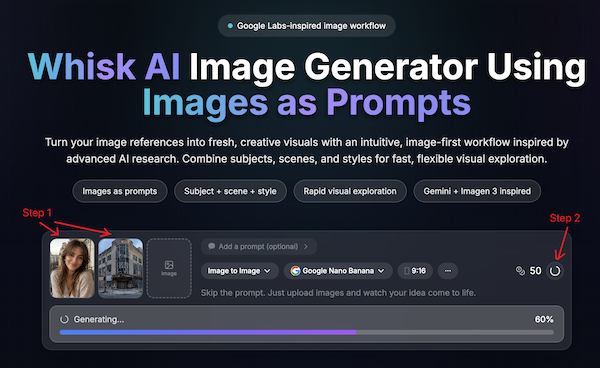
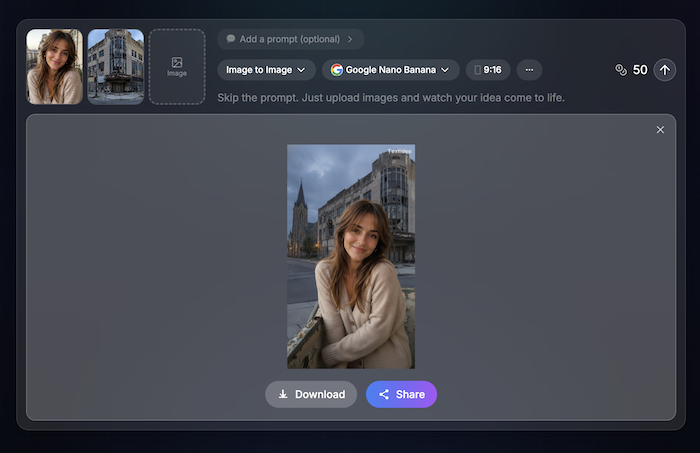
Step 1: Upload a Reference Image
Upload any image you like.
Examples:
- A character photo
- A product image
- An illustration
- An artwork
- A logo
- A landscape
Step 2: Click Generate
The AI automatically analyzes the image and creates new variations inspired by it.
Perfect when you want:
- Similar styles
- New compositions
- Creative remixes
- Alternative versions
Method 2: Upload Images + Add an Idea
Want more control?
Upload one or more images and optionally describe what you want.
Examples:
- "Turn this into anime style"
- "Make it look like a Pixar movie"
- "Place this character in a cyberpunk city"
- "Create a product advertisement"
The AI combines your images with your idea to generate a completely new result.
Method 3: Mix Multiple Images
You can upload several images at once.
For example:
Image A
A person or character
Image B
An artistic style
Image C
A background scene
The AI blends these elements together into a new image.
Example:
- Subject from Image A
- Style from Image B
- Environment from Image C
Result: A brand-new composition.
Tips for Better Results
Use High-Quality Images
Clear images help the AI understand details more accurately.
Keep the Main Subject Visible
Avoid heavily cropped or blurry images.
Try Different Combinations
Small changes in reference images can produce dramatically different results.
Add Short Instructions
Even a simple idea such as:
- "watercolor"
- "3D render"
- "cinematic lighting"
- "fantasy world"
can significantly influence the output.
Do I Need to Write Prompts?
No.
This tool is designed for people who don't want to learn prompt engineering.
You can simply:
- Upload an image
- Click Generate
The AI handles the rest.
Common Use Cases
Character Design
Create new character variations while keeping a similar appearance.
Product Photography
Generate marketing images from product photos.
Style Transfer
Apply artistic styles from one image to another.
Social Media Content
Create unique visuals for posts and campaigns.
Creative Exploration
Experiment with different styles, compositions, and concepts quickly.
Best Practice
For most users, the easiest workflow is:
- Upload 1–3 reference images.
- Optionally enter a short idea.
- Click Generate.
- Regenerate until you find your favorite result.
The less time you spend writing prompts, the more time you can spend creating.
✏️Leave a Comment